The Problem with Traditional Data Lakes
Modern organizations generate and store vast amounts of data in data lakes, leveraging their flexibility to handle structured and unstructured data at scale. However, traditional data lakes face persistent challenges:
- Lack of data consistency: No built-in support for transactional updates leads to potential data corruption.
- Poor data quality: Absence of schema enforcement allows bad or incompatible data to enter the system.
- Limited data management: Operations like updates, deletes, and historical queries are cumbersome or unsupported.
- Complex analytics: Direct querying is unreliable, often necessitating costly ETL pipelines to data warehouses for analytics and machine learning.
These issues hinder the reliability and governance of big data architectures, especially as organizations demand real-time analytics, compliance, and robust data pipelines.
What is Delta Format and Delta Table?
Delta Format is an open-source storage format built on top of Apache Parquet, designed to bring database-like reliability and transactional integrity to data lakes. It introduces a transactional log (Delta Log) that tracks all changes, enabling advanced features such as ACID transactions, data versioning, and schema enforcement.
A Delta Table is a table stored in Delta Format, typically residing in cloud object storage (e.g., S3, Azure Blob, GCS). It combines the scalability of data lakes with the reliability and performance of data warehouses, supporting both batch and streaming data processing.
Core components:
- Parquet files: Store the actual data in a column format.
- Delta Log: A transaction log that records every change, enabling features like time travel, rollback, and audit trails.
Why Was Delta Format Created?
Delta Format was developed to bridge the gap between data lakes and data warehouses—a vision now known as the “lakehouse” architecture. Its creation addresses several key pain points:
- Transactional integrity: Traditional data lakes lack ACID guarantees, making them unreliable for concurrent or complex data operations.
- Data quality and governance: Without schema enforcement and auditability, ensuring data quality and compliance is challenging.
- Unified analytics: Organizations wanted to eliminate the need for separate ETL pipelines and enable direct, reliable analytics on raw data.
By adding a transactional storage layer on top of a data lake, Delta Format enables consistent, reliable, and high-performance data management—paving the way for modern analytics, machine learning, and business intelligence directly on the data lake.
How Does Delta Format Work?
Delta Format enhances Parquet-based storage with a transactional log and metadata management:
- ACID Transactions: All data modifications (inserts, updates, deletes) are atomic, consistent, isolated, and durable. This prevents partial updates and ensures data integrity, even under concurrent workloads.
- Delta Log: Every change to a Delta Table is recorded in a log, which allows the system to reconstruct any version of the data. This log enables:
- Time travel: Query data as it existed at any point in time.
- Rollback: Revert changes in case of errors or data corruption.
- Auditability: Track who changed what and when.
- Schema Enforcement and Evolution: Data must conform to the defined schema, preventing bad data from entering the system. Schema evolution allows for adding or changing columns without rewriting the entire dataset.
- Performance Optimizations: Features like data skipping, compaction, indexing, and Z-ordering improve query speed and reduce storage footprint.
- Unified Batch and Streaming: Delta Tables support both batch and streaming data ingestion and processing, ensuring data consistency across workflows.
What Can Be Done with Delta Tables?
Delta Tables unlock a wide range of advanced data management and analytics capabilities:
- CRUD Operations: Create, read, update, and delete records efficiently.
- Upserts and Merges: Merge new data with existing tables, useful for change data capture (CDC) and data synchronization.
- Time Travel: Query historical versions for auditing, debugging, or recovery.
- Data Lifecycle Management: Automate data retention and cleanup with commands like
VACUUM. - Data Pipelines: Build robust ETL/ELT pipelines with transactional guarantees and schema enforcement.
- Machine Learning and BI: Use high-quality, versioned data directly for analytics and model training.
- Unified Batch and Streaming Processing: Ingest and process data in real-time or in batches using the same table.
- Audit and Compliance: Maintain a full audit trail of changes for regulatory compliance.
Benefits of Delta Format and Delta Tables
- Reliability: ACID transactions ensure data integrity and prevent corruption.
- Performance: Optimized storage and metadata handling enable fast queries at scale.
- Scalability: Designed for petabyte-scale datasets and billions of files.
- Flexibility: Supports schema evolution and unified batch/streaming processing.
- Governance: Full audit trails, versioning, and schema enforcement improve data quality and compliance.
- Open Source and Interoperability: Works with major cloud and on-premises platforms, and supports open APIs for Spark, Python, Scala, and more.
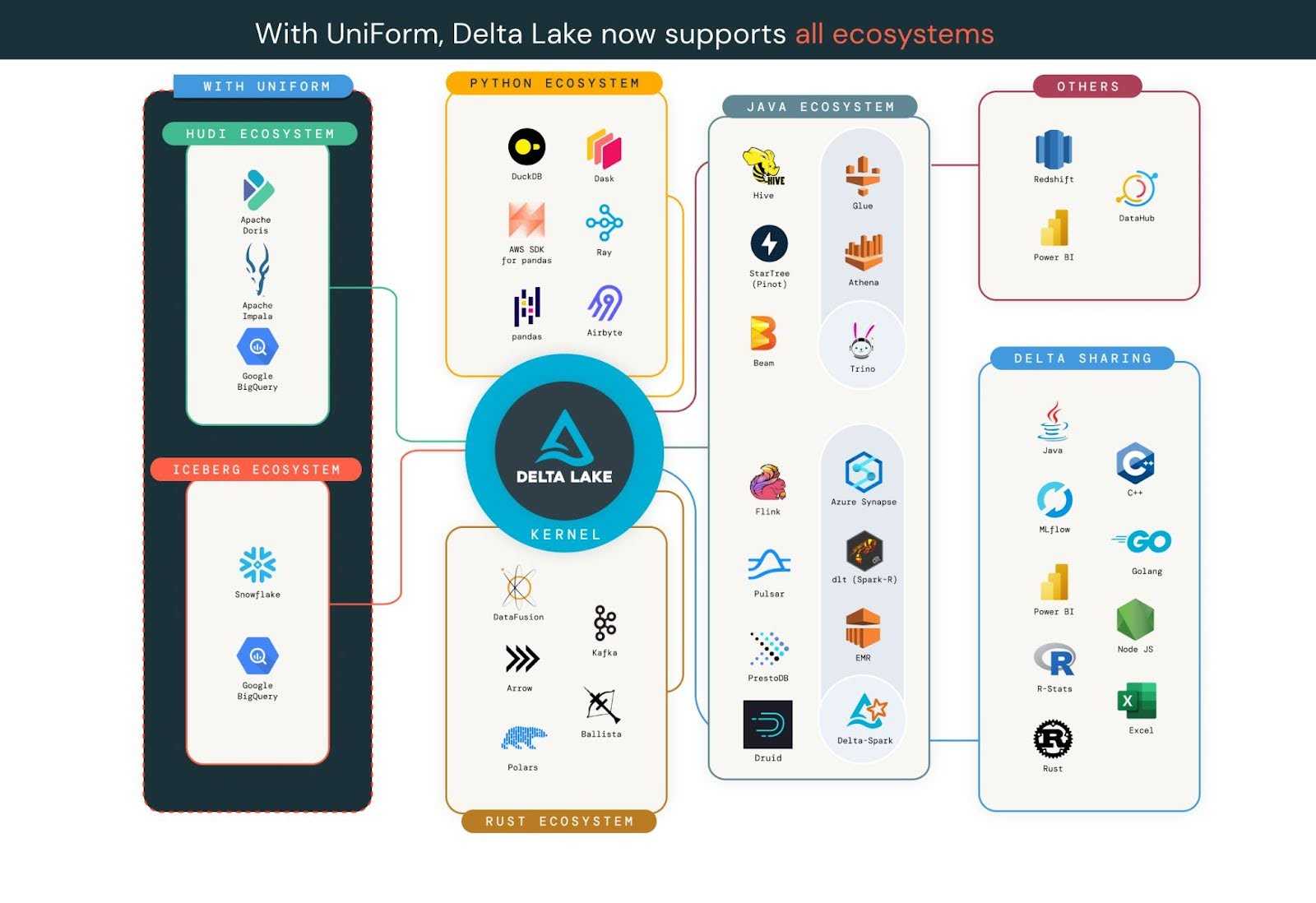 Source: https://delta.io/blog/state-of-the-project-pt2/
How to start using Delta Tables ?
Implementation Steps (Example with PySpark):
from pyspark.sql import SparkSession

# Initialize Spark session
spark = SparkSession.builder.appName("DeltaTableExample").getOrCreate()

# Read data and write as Delta Table
df = spark.read.csv("input.csv", header=True)
df.write.format("delta").save("/mnt/delta/my_table")

# Read Delta Table
delta_df = spark.read.format("delta").load("/mnt/delta/my_table")

# Update Delta Table
from delta.tables import DeltaTable
deltaTable = DeltaTable.forPath(spark, "/mnt/delta/my_table")
deltaTable.update(
    condition = "id = 1",
    set = { "status": "'active'" }
)

# Time travel (query previous version)
historical_df = spark.read.format("delta").option("versionAsOf", 2).load("/mnt/delta/my_table")
To further enhance your data lakehouse architecture, Databricks offers a fully managed, cloud-based platform that deeply integrates with Delta Format and Delta Tables. On Databricks, Delta Lake is the default storage layer, meaning that all tables are Delta tables by default unless otherwise specified. This seamless integration allows users to leverage the full spectrum of Delta Lake features—such as ACID transactions, scalable metadata handling, and unified batch and streaming data processing—using familiar Spark APIs and SQL syntax. Databricks also provides advanced tools for creating, managing, and optimizing Delta Tables, including declarative data pipelines and automated cluster management.
Databricks offers a Free Edition—a no-cost version designed for students, developers, and anyone interested in experimenting with data and AI. This Free Edition provides access to the same unified workspace and core functionalities used by millions of professionals, allowing users to build, analyze, and collaborate on data projects without any financial commitment. It is ideal for learning, prototyping, and testing Delta Lake features, including Delta Tables, in a serverless, quota-limited environment. Users can explore real datasets, design data pipelines, and leverage interactive notebooks and dashboards, all while benefiting from integrated tools like the Databricks Assistant for coding help
Conclusion
Delta Format and Delta Tables have transformed the landscape of big data management by bringing transactional integrity, performance, and governance to data lakes. They enable organizations to build reliable, scalable, and flexible data architectures—supporting modern analytics, machine learning, and compliance needs—while leveraging the cost and scale advantages of cloud storage.
Sources
-
https://www.purestorage.com/knowledge/what-is-delta-lake.html
-
https://www.woodmark.de/en/blog-detail/demystifying-databricks-delta-lake-format
-
https://randomtrees.com/blog/an-in-depth-guide-to-delta-lake/
-
https://learn.microsoft.com/en-us/azure/databricks/introduction/delta-comparison
-
https://docs.databricks.com/aws/en/introduction/delta-comparison
-
https://learn.microsoft.com/en-us/azure/synapse-analytics/spark/apache-spark-what-is-delta-lake
Post Image: https://docs.delta.io